Records keep the facts. FamilyLoupe reveals the lives.
Your story didn't start with you.
A modern desktop app for understanding your family history — patterns, places, longevity, migrations — across the lives that made yours possible.
Thanks — we'll be in touch when the next early-access spot opens.
90-day free trial·One-time license·Your data stays on your machine
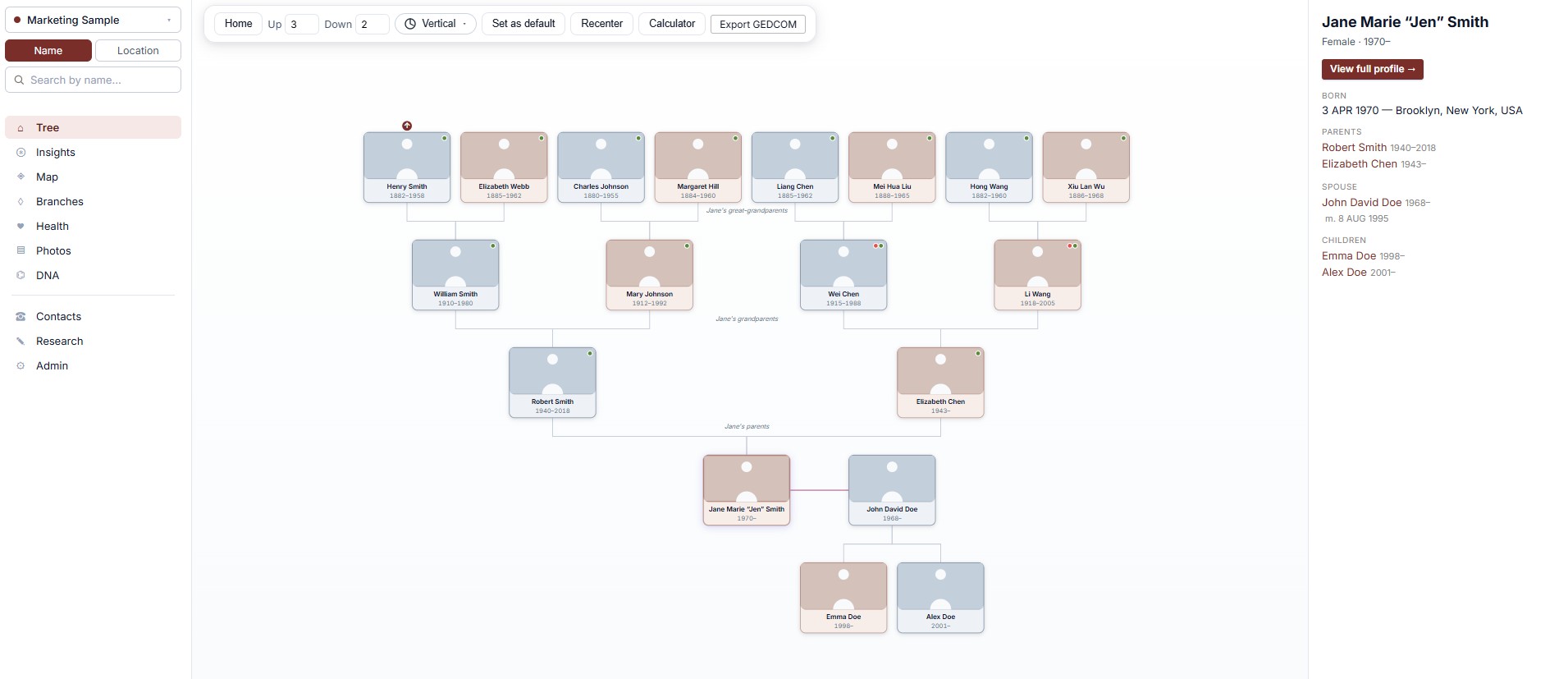
FamilyLoupe — Tree view
—□✕
01Patterns over records.
02Yours, not rented.
03Beautiful and fast.
Why FamilyLoupe
The big sites store your family. FamilyLoupe helps you understand it.
Most genealogy software is a filing cabinet with a search box. FamilyLoupe is built around a different question: now that you've gathered the records, what do they actually tell you about the people you came from — and about yourself?
Your tree, on your computer
No subscription. No platform lock-in. Your GEDCOM, photos, and edits live in folders you own. If we ever disappear, your tree doesn't. Sync to Dropbox, back up to a thumb drive, hand it to your grandchildren in 40 years — it's a folder.
Insights, not just an archive
Life expectancy by line, by sex, by century. Economic mobility across every documented generation. Migration journeys on a year-slider map. Most-distant ancestor on each branch. An endogamy detector. A "what's missing" research priority list. Charts that surprise you.
Built for one life at a time
The tree is rooted on you. Every page answers "what does this mean for me?" — your branches, your inherited haplogroups, your ancestors' wealth trajectory, the relationship calculator that names exactly how your second cousin is your second cousin.
See it in action
Real screenshots, not mockups.
Every shot below is the actual app, captured against a sample family.
FamilyLoupe is one self-contained desktop app. No accounts, no cloud, no monthly bill. Here's what's inside.
Living tree
Pan, zoom, click any card to refocus. Expand-up arrows on outer ancestors. The tree is the home page.
Profile pages
Names, dates, places, occupations, addresses, facts, signatures, custom life events — and inline pencils to edit any of it.
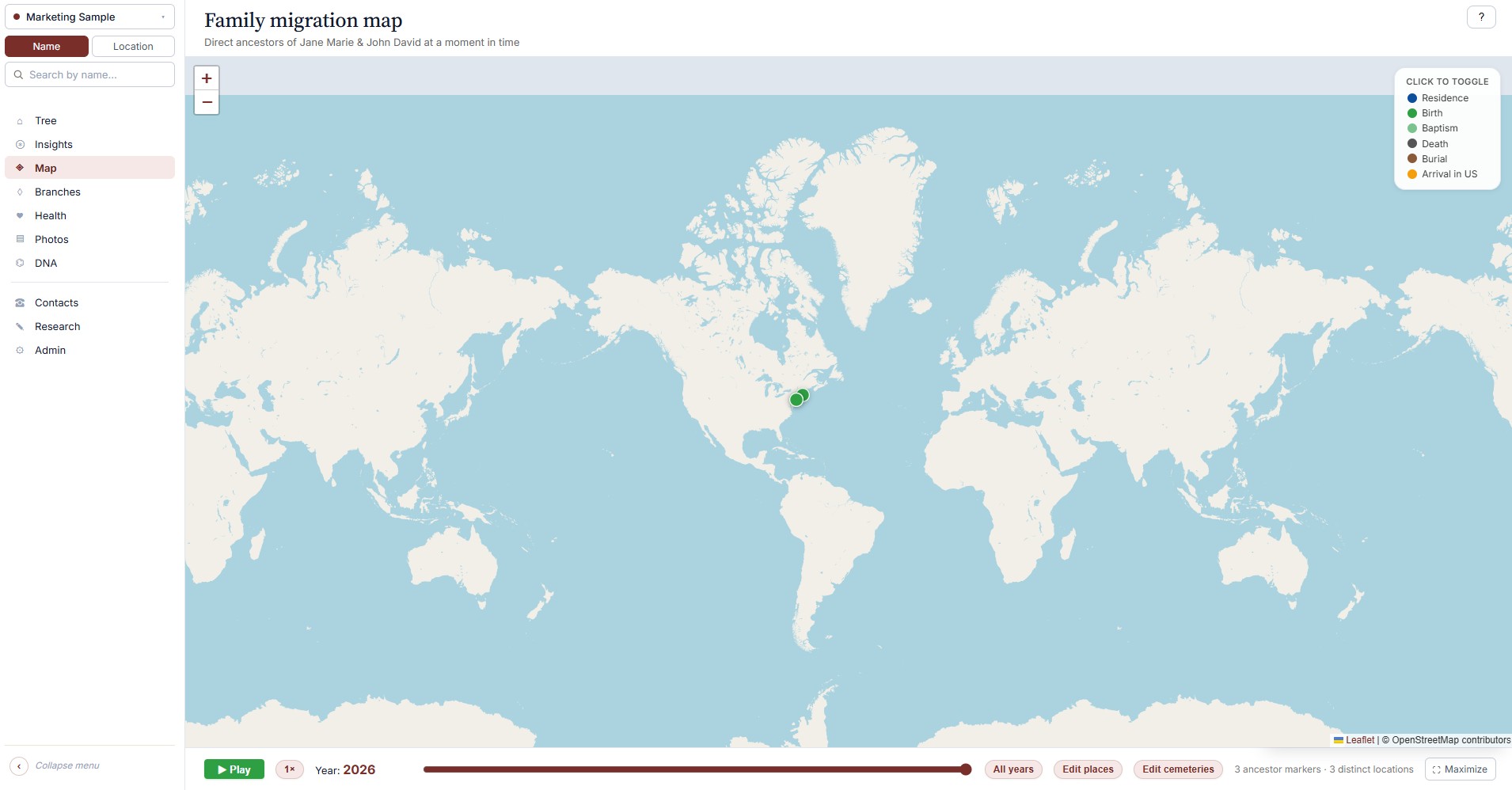
Year-slider map
Watch your ancestors arrive, settle, scatter. Press play and centuries of migration unfold on one map.
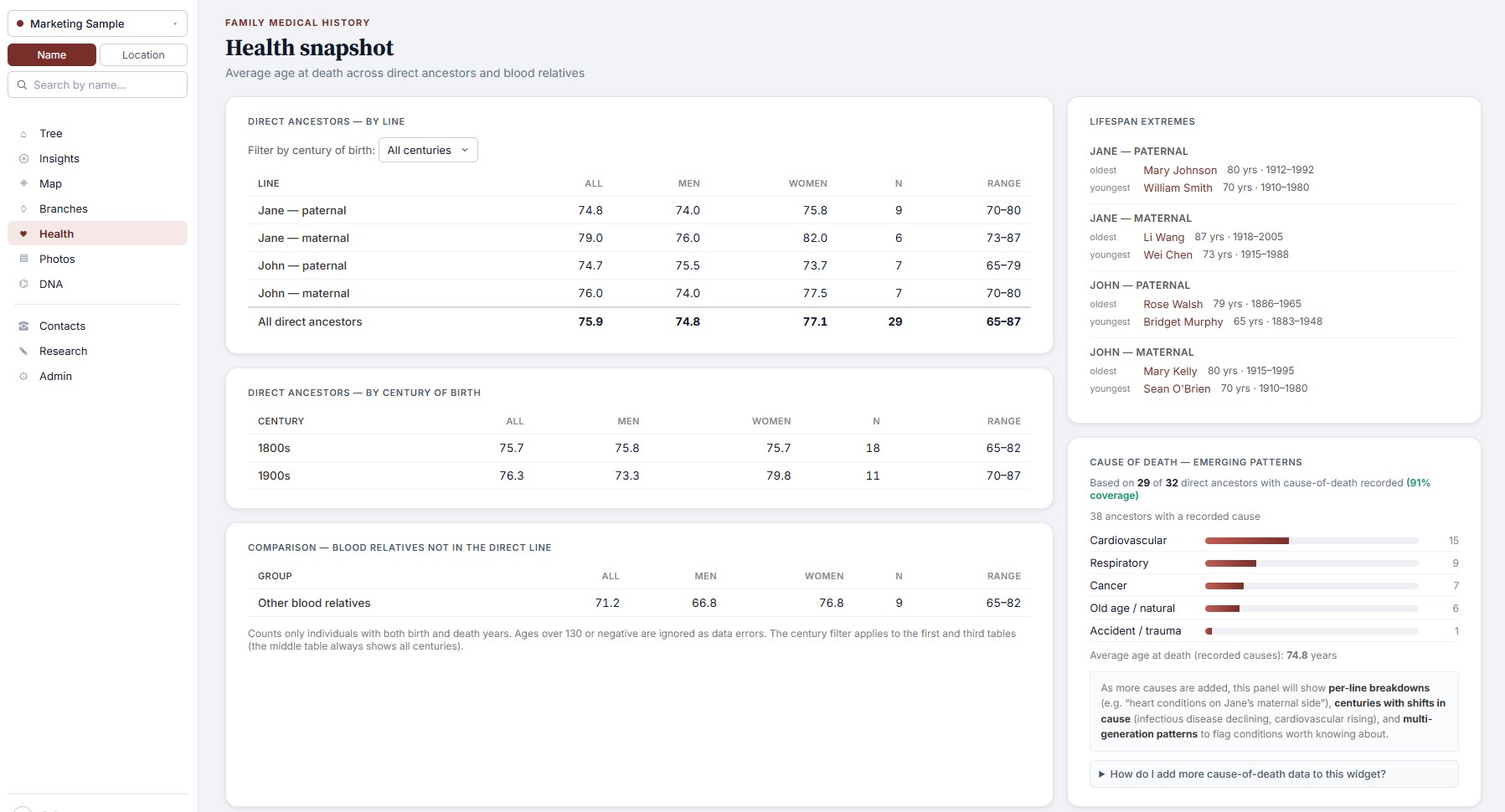
Health snapshot
Life expectancy by branch, by sex, by century. Causes of death by category. The longevity story of your family.
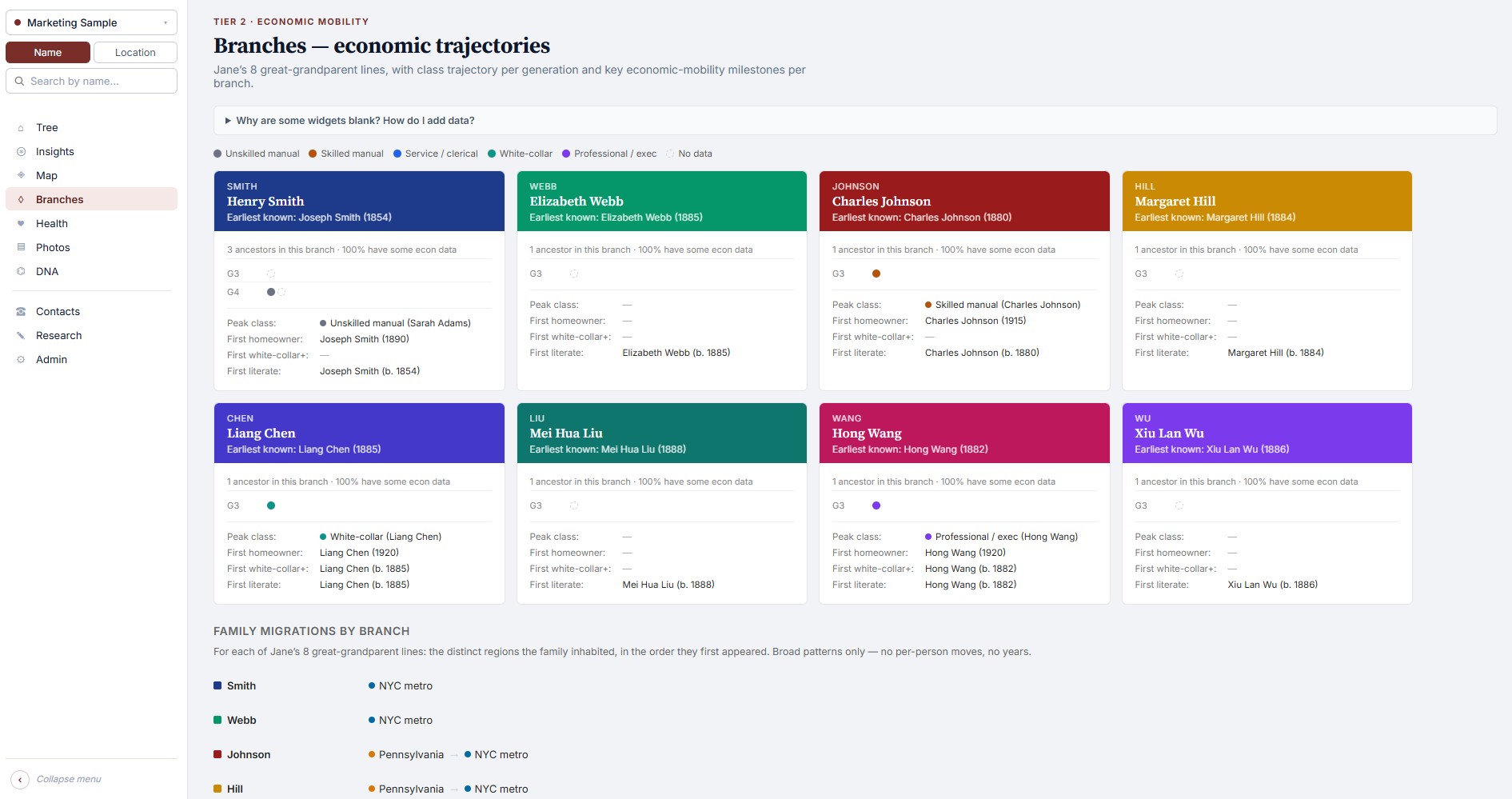
Branches & mobility
Eight great-grandparent lines, color-coded. Wealth and class trajectories as deep as your tree goes.
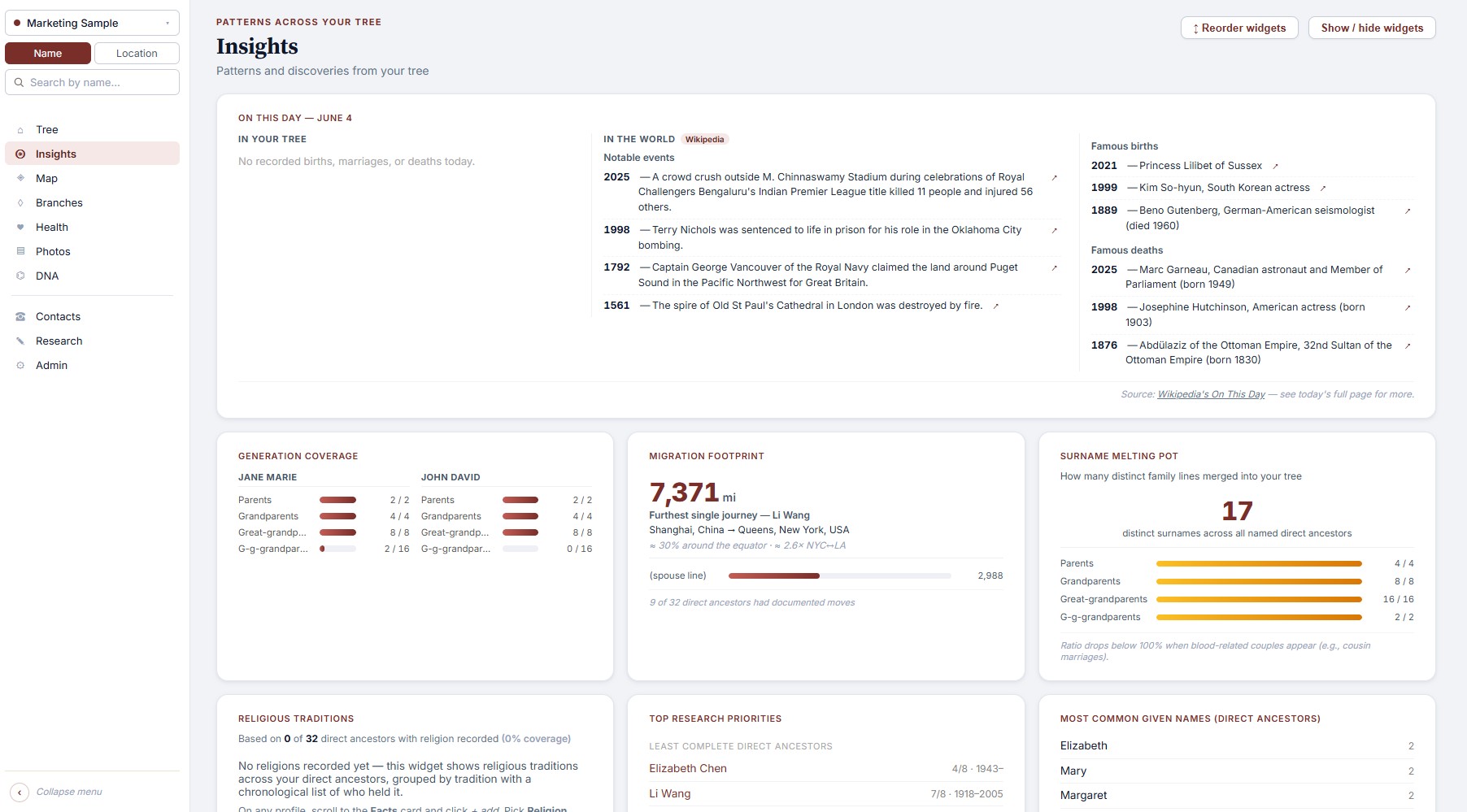
Insights cards
Today in history. Generation coverage. Most distant ancestor per line. Common given names. Endogamy. Research priorities.
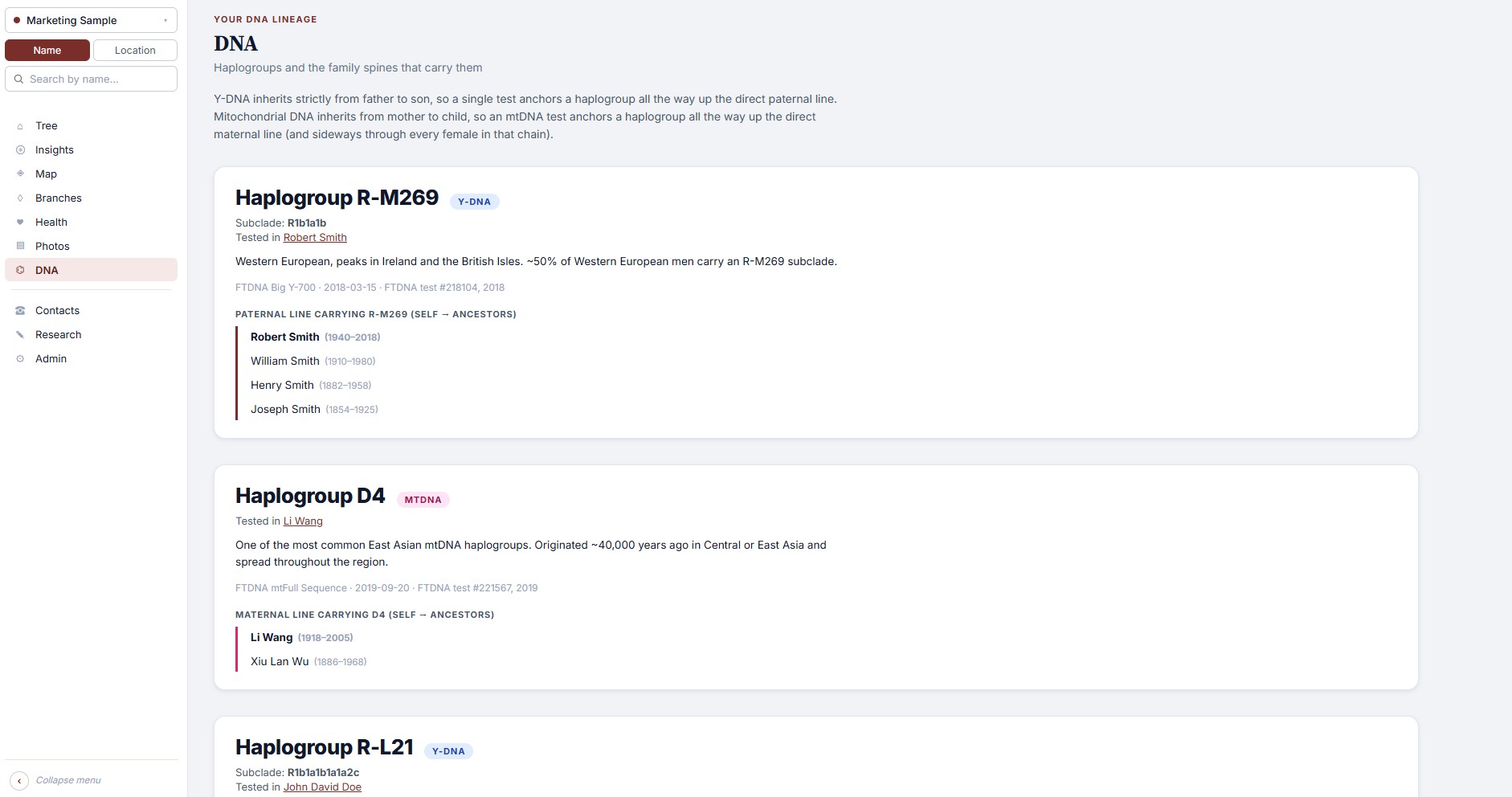
DNA & haplogroups
Y-DNA and mtDNA inheritance spines. Add your test, see which ancestors share each haplogroup.
Stories & histories
Oral history from living relatives, kept distinct from book-sourced family histories. With sources, photos, and people-tags.
Photos wall
Every personal photo across the tree, in one scroll. Click any face to jump to the profile.
Relationship calculator
Type any two people. FamilyLoupe finds the common ancestor and tells you exactly how they're related.
Multi-tree
Keep your tree and your spouse's separately, or research a friend's family. One license covers all of them.
Sources & citations
Every fact can carry a source. Census images, wills, ship manifests, civil registries — transcribe inline, never lose the trail.
And one more thing
Pets, too — if you want.
Some families wouldn't be themselves without the dog who slept on every couch, the cat who outlasted four jobs, the parrot who learned grandma's whistle. FamilyLoupe has first-class records for them, with the depth they deserve.
Real profile cards. Name, sex, species, breed admixture, birth, adoption, passing, cause of death, burial. Free-text notes for the stories.
Multiple owners. Pets attach to one or more people in the tree. They show up on every owner's profile.
Custom species. Built-ins for dogs and cats, plus add your own — hamsters, parrots, the family donkey.
Off by default. Genealogy purists who'd rather keep pets out of the picture won't see the widget. Flip it on in Settings if pets are family in your household.
Passed 2021
Rex
Dog · M
13 years with the family
Born2008
AdoptedJun 2008
Passed2021
CauseCancer
WithMargaret & Robert Clarke
Breed
Golden Retriever 70%
Lab 30%
How we compare
FamilyLoupe isn't trying to replace Ancestry.com. We do different things.
The big sites are research databases — billions of records, hint engines, DNA matching with millions of testers. Use them to find your ancestors. Then use FamilyLoupe to own what you found, and to actually understand the picture.
The big sites
FamilyLoupe
Records database
World-class — billions of indexed records
None. Use Ancestry / FamilySearch for research, then bring your GEDCOM here.
Cloud-stored under their privacy policy; subject to research-partner sharing and government requests
Local app — no data leaves your computer, no telemetry
We use Ancestry too. The two tools complement each other.
How it works
From install to first insights in under ten minutes.
If you already have a GEDCOM export from Ancestry, MyHeritage, or any other genealogy tool, you're four steps away.
Install
Download the Windows installer. About 70 MB. No accounts, no setup wizard hell.
Bring your tree
Import a GEDCOM, or start from scratch, or try the bundled sample family.
Pick yourself
Choose your home person (and optionally your spouse). The tree centers on you.
Explore
Insights light up immediately. Edit, add stories, attach photos, watch the picture sharpen.
Pricing
Try it for three months. Then a one-time license.
Genealogy software shouldn't cost more than the records you find with it. No subscriptions, no tiers, no upsells. Try the full app free for 90 days. If you keep using it, the license costs less than a single month of Ancestry.com — and you only pay once.
Free trial
$0
For 90 days
Every feature unlocked
No credit card required
Your data stays yours after the trial — only editing is paused
Your data is yours. It lives in standard formats — your GEDCOM is GEDCOM, your photos are JPGs, your edits are a human-readable JSON file — in a folder on your computer. If we vanish tomorrow, you can open every file with software that already exists, and your existing install keeps running.
This is the opposite of how most genealogy companies work. It's a deliberate design choice.
Does it really work offline?
Yes, fully — the core app never needs the internet. The only baseline network call is one-time geocoding of place names to map coordinates (cached after first run). Two opt-in features, off by default, can talk to the internet if you turn them on: the AI chatbot when set to a cloud backend like OpenAI or Groq (set it to Ollama instead and it stays fully local), and the MCP integration when you connect Claude Desktop, Cursor, or VS Code to your tree. Both are clearly disclosed in Settings before you enable them.
Will my Ancestry GEDCOM work?
Yes. FamilyLoupe reads standard GEDCOM 5.5.1 files, including the extended tags Ancestry, MyHeritage, Family Tree Maker, and RootsMagic produce. We also read the newer GEDCOM 7 format and GEDZip (.gdz) archives — both are auto-detected, so you don't need to know which version your file is. Re-import anytime your research GEDCOM updates — your local edits, photos, and stories are preserved.
Will all the features work with just my GEDCOM?
Most of them, immediately. The tree, profiles, map, photos wall, branches, relationship calculator, life-expectancy snapshot, "today in history," common-names analysis, generation coverage, and most of the insights cards all work the moment you import a standard GEDCOM.
A few of the deeper features depend on data that GEDCOM files rarely carry — cause-of-death analysis needs you to add causes of death, the economic-mobility view needs occupations and a few facts like home ownership and acreage, and the DNA inheritance spines need you to record your test results. None of this requires research from scratch — FamilyLoupe has inline editors for every field, and you only need to fill in the ancestors you actually want to study. The features fade in as you add data.
Can I export my data?
You don't need to. It's already exported — the GEDCOM and your overrides file are sitting in the install folder right now. You can also export a refreshed GEDCOM at any time that includes everything you've added in FamilyLoupe, ready to import back into another tool. Export defaults to GEDCOM 5.5.1 (the format almost every genealogy service still uses today); GEDCOM 7 is available as an alternative in Tree settings if you specifically need it.
Is there a Mac or Linux version?
FamilyLoupe is Windows only at launch. Mac is a likely follow-up. The engine is Python, so a Mac build is a packaging job, not a rewrite — but we want to nail the Windows experience first. Linux users with Python installed can run from source today, though it's not officially supported.
How is this different from Family Tree Maker, RootsMagic, or Legacy?
Those are mature record-keeping tools — strong on data entry, with decades of polish on capturing every detail of a research session. FamilyLoupe overlaps with that work, but the heart of it is the analysis layer that surfaces patterns the others don't try to show you.
Specifically: life expectancy by branch, sex, and century. Economic mobility tracked as far back as your records go. A year-slider map that animates centuries of migration. Branch coverage so you can see what's missing. An endogamy detector. Rooted-on-you views — your branches, your inherited haplogroups, your ancestors' wealth trajectory across time. Multi-tree from a single license. And a fast, modern UI built for it from day one rather than retrofitted onto two decades of legacy.
Many users will keep their existing tool for data entry and use FamilyLoupe to actually see the shape of their family. They complement each other — and FamilyLoupe comes in below all of them on price ($29.99 vs. RootsMagic's $34.95, Legacy's $35, FTM's $80).
How does the AI assistant work, and what does it cost?
FamilyLoupe ships two optional AI features. Both are off by default and both are bring-your-own-key — we don’t bundle an AI subscription into the price, so you choose the provider, you pay them directly, and you control the privacy posture.
1. In-app chatbot. A chat button on every page that knows your tree. Useful for things like “who in my tree died young?” or “find everyone with a Boston connection.” Two ways to power it:
Local (Ollama) — runs a model on your own computer. Fully offline. Free. Best for privacy.
Cloud (Groq, OpenAI / ChatGPT) — sends your question + up to ~20 records the chatbot judged relevant to that provider, using your API key. Stronger reasoning, costs whatever the provider charges (typically pennies per question).
2. MCP integration. An optional sidecar that exposes your tree to any AI desktop app that speaks the Model Context Protocol. Currently supported: Claude Desktop (current build with MCPB extensions), Cursor, VS Code (via GitHub Copilot Chat 1.99+), and Claude Desktop legacy config. Once connected via the one-click flow in Admin → AI integrations, you can ask your tree questions from inside the AI app you already use. Uses your existing AI subscription — no separate cost to FamilyLoupe.
Both features only send data when you ask the AI a question that requires it, and only the records relevant to that question — never your full tree. Each provider has its own retention policy; we surface it in Settings before you opt in.
Is my data sent anywhere?
No telemetry, no analytics, no “anonymous usage stats.” FamilyLoupe does not phone home. The only baseline network call is geocoding (place names → coordinates, via OpenStreetMap’s free Nominatim service — calendar dates only, never your tree).
Two optional AI features can send data over the internet if you opt in: the in-app chatbot when configured with a cloud backend (Groq, OpenAI / ChatGPT — uses your own API key), and the MCP integration when you connect Claude Desktop or another external AI client to your tree. In both cases, your question and a small set of records the AI specifically asked for are sent to whichever provider you chose — never your full tree, never proactively, never without you asking the question. Each provider has its own data-retention policy; pick the one whose terms you trust. The source is not obfuscated — you can verify all of this.
What happens after the 90-day free trial?
The app drops into read-only mode: you can still browse your tree, look at photos, run insights, use the map — but the edit buttons are hidden. Buy a license at any time and editing turns back on. Your data is never deleted, locked, or held hostage.
Get early access
Your story didn't start with you.
See where it did.
Thanks — we'll be in touch when the next early-access spot opens.